
cloudflare workers 反代emby教程
Cloudflare Workers 是 Cloudflare 提供的一种无服务器计算平台,允许开发者在 Cloudflare 的边缘网络上运行 JavaScript 代码。通过使用 Workers,您可以轻松地实现反向代理功能,将请求转发到其他服务器或服务。以下将介绍如何使用 Cloudflare Workers 实现emby的反向代理功能并优选域名。 一共分为三个步骤,第一步是准备工作,第二步是实现cloudflare workers反代功能,第三步是优选域名
第一步:准备工作
在开始之前,您需要准备以下内容:
- Cloudflare 账户:如果您还没有 Cloudflare 账户,请前往 Cloudflare 官网 注册一个免费账户。
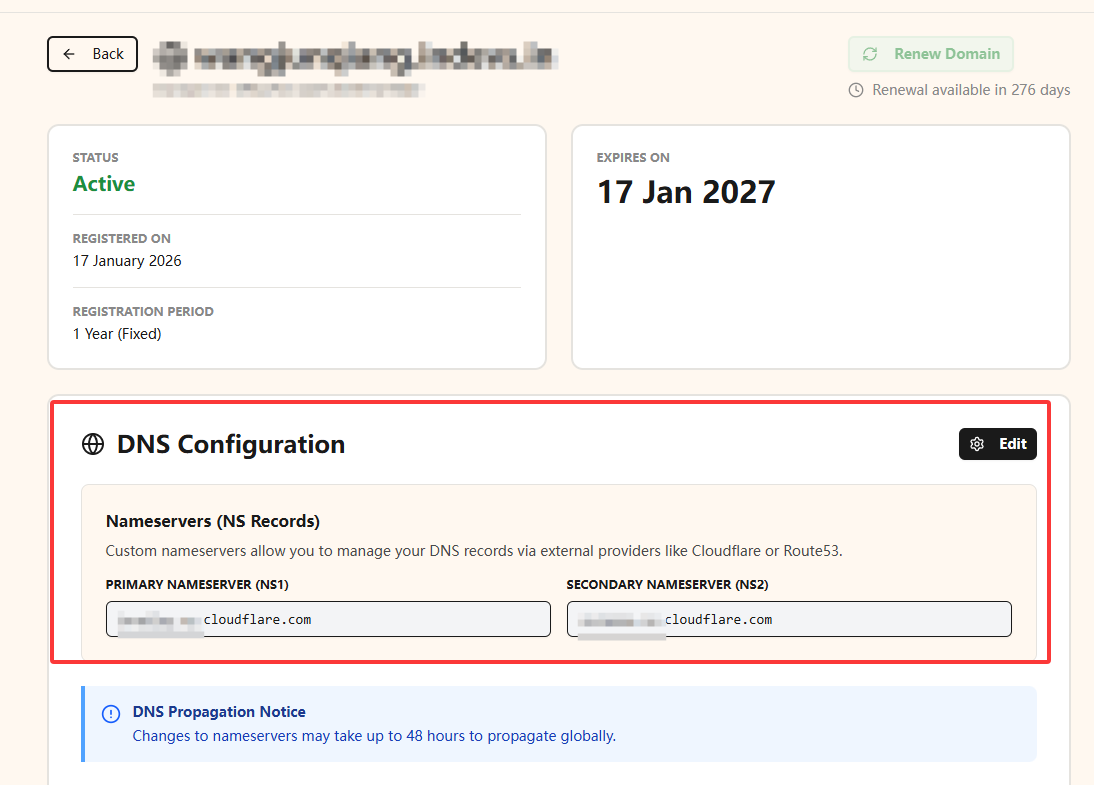
- 域名:您需要一个域名来配置 Cloudflare Workers 的路由。您可以使用现有的域名,或者申请一个免费的子域名:例如在 https://domain.stackryze.com/ 上,按照指引注册并获取一个免费的子域名并托管到 Cloudflare。如图所示将DNS NS 配置为 Cloudflare 提供的 NS 服务器:
第二步:实现 Cloudflare Workers 反代功能
创建 Cloudflare Worker
- 登录 Cloudflare 账户并进入 Workers 页面。
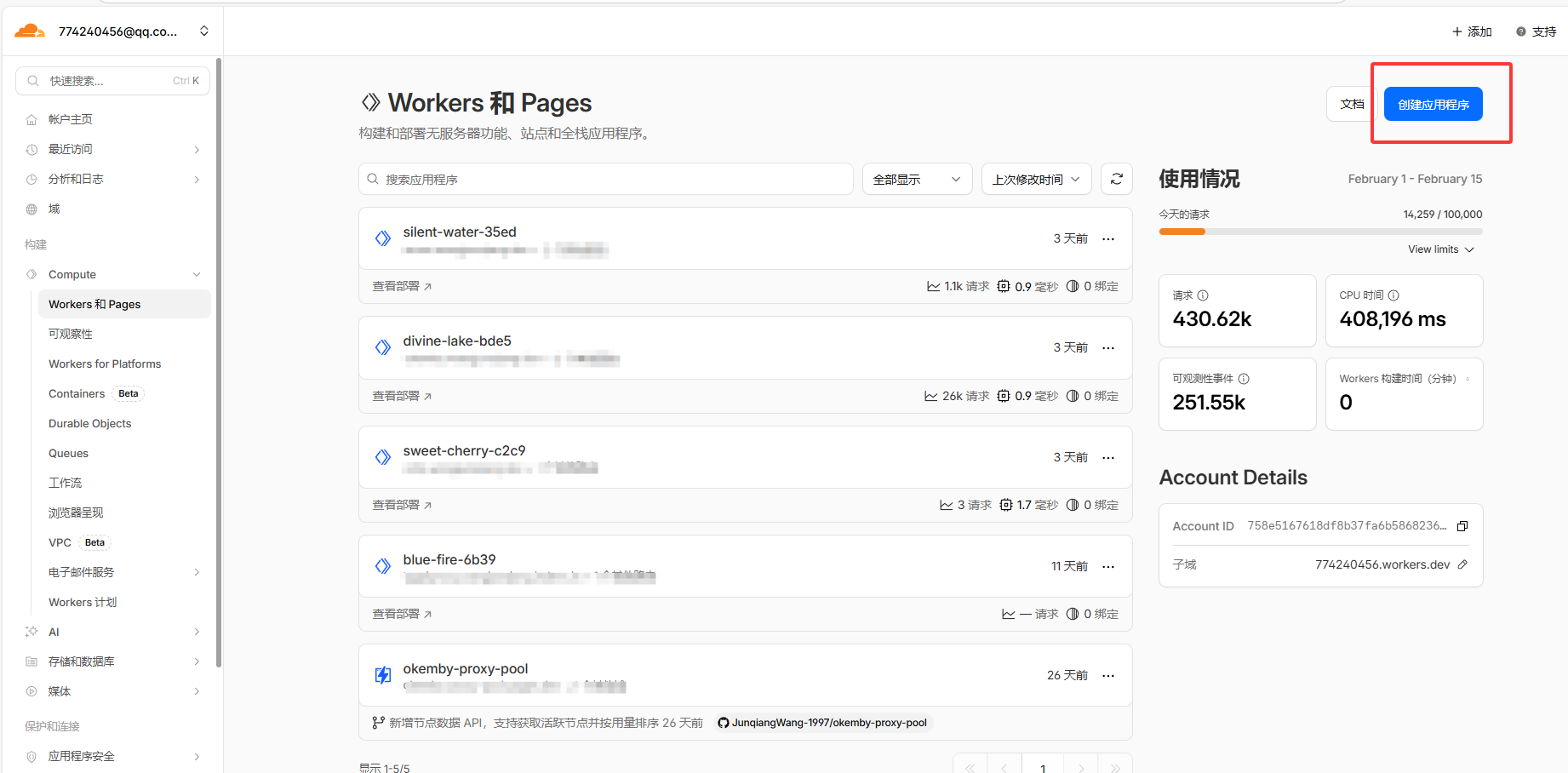
- 点击 “创建应用程序” 按钮,创建一个新的 Worker,选择从hello world模板开始,点击部署。
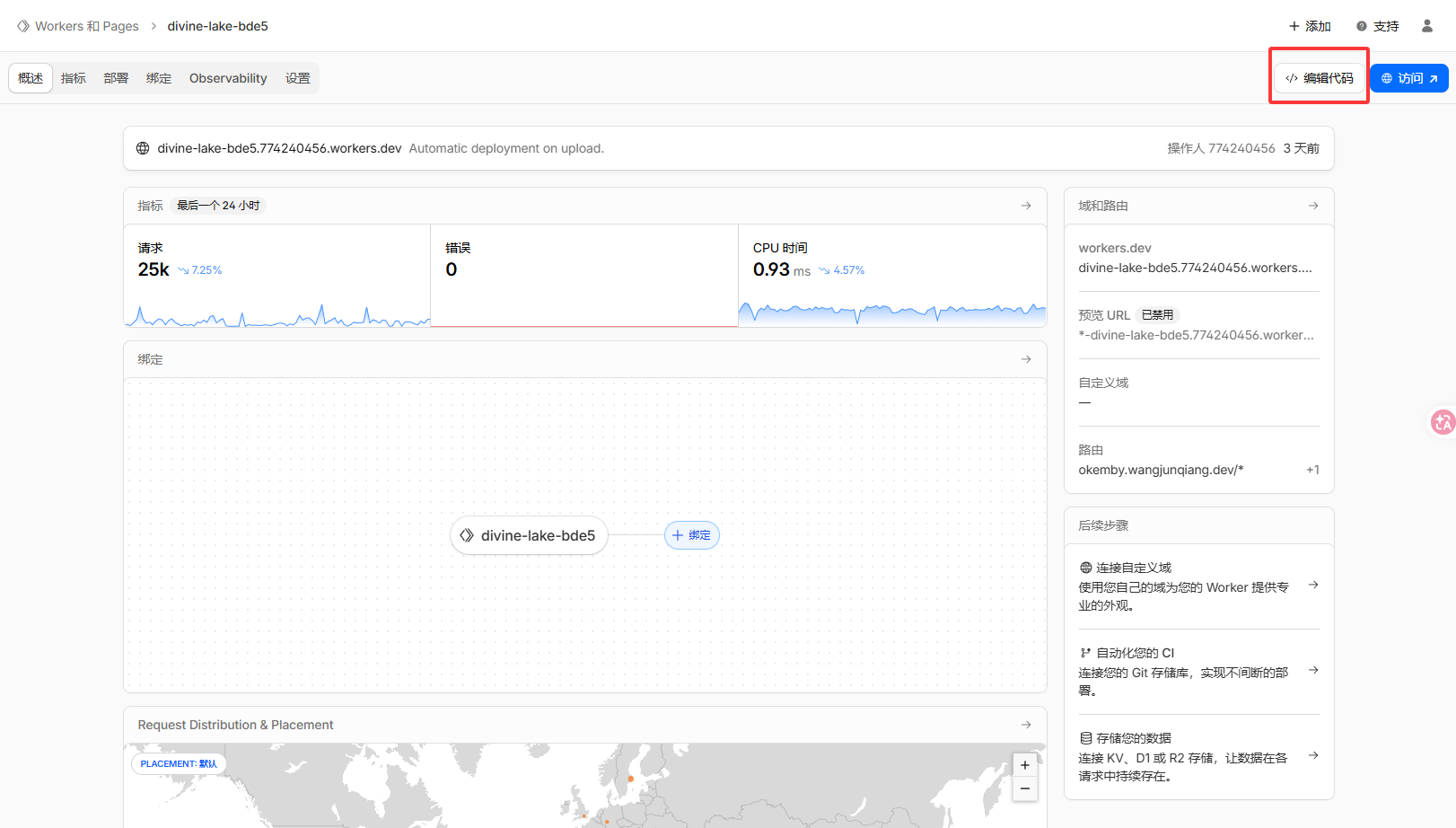
- 然后选择已经部署的 Worker,点击编辑代码,替换默认代码为以下反向代理代码并保存:
export default {
  async fetch(request, env, ctx) {
    // ================= 配置区域 =================

    // [修改这里] 请填入 emby 的实际回源地址
    const upstream_domain = 'www.example.com'; // 例如:emby.yourdomain.com
    const upstream_port = '443';        // 通常是 443
    const upstream_protocol = 'https';   // 通常是 https

    // ===========================================

    const url = new URL(request.url);
    const worker_domain = url.host;

    // 获取客户端信息
    const clientIP = request.headers.get('CF-Connecting-IP') || 'Unknown';
    const country = request.cf ? request.cf.country : 'XX';
    const requestId = request.headers.get('cf-ray') || '-';
    const userAgent = request.headers.get('User-Agent') || '';

    // -----------------------------------------------------------
    // 0. 强制 HTTPS 跳转
    // -----------------------------------------------------------
    if (url.protocol === 'http:') {
      url.protocol = 'https:';
      return Response.redirect(url.href, 301);
    }

    // -----------------------------------------------------------
    // 1. 恶意 User-Agent 快速拦截
    // -----------------------------------------------------------
    const bad_agents = ['python', 'curl', 'wget', 'http-client', 'scrapy', 'java/', 'go-http'];
    if (bad_agents.some(agent => userAgent.toLowerCase().includes(agent))) {
      return new Response("403 Forbidden: Bot detected", { status: 403 });
    }

    // -----------------------------------------------------------
    // 2. 拦截 robots.txt
    // -----------------------------------------------------------
    if (url.pathname === '/robots.txt') {
      return new Response("User-agent: *\nDisallow: /", {
        status: 200,
        headers: {
          'Content-Type': 'text/plain; charset=utf-8',
          'Cache-Control': 'public, max-age=86400'
        }
      });
    }

    // -----------------------------------------------------------
    // 3. 地区检测:仅允许中国大陆 IP(保留你原逻辑)
    // -----------------------------------------------------------
    if (country !== 'CN' && country !== 'XX') {
      const geoHtml = `
      <!DOCTYPE html>
      <html lang="zh-CN">
      <head><meta charset="UTF-8"><title>403 Access Denied</title></head>
      <body style="display:flex;justify-content:center;align-items:center;height:100vh;background:#f5f6f7;font-family:sans-serif;text-align:center;">
        <div style="background:white;padding:2rem;border-radius:12px;box-shadow:0 10px 25px rgba(0,0,0,0.05);max-width:400px;border-top:5px solid #ff4757;">
          <h1 style="color:#2d3436;font-size:1.5rem;">🚫 访问被拒绝</h1>
          <p style="color:#636e72;">本服务仅限中国大陆地区直连访问。</p>
          <div style="background:#f1f2f6;padding:1rem;border-radius:8px;font-family:monospace;text-align:left;font-size:0.9rem;">
            <div>IP: ${clientIP}</div>
            <div>Loc: ${country}</div>
            <div>Ray: ${requestId}</div>
          </div>
        </div>
      </body>
      </html>`;

      return new Response(geoHtml, {
        status: 403,
        headers: {
          'Content-Type': 'text/html; charset=utf-8',
          'Cache-Control': 'public, max-age=3600'
        }
      });
    }

    // -----------------------------------------------------------
    // 4. 路径检测:仅允许 /emby 开头
    // -----------------------------------------------------------
    if (!url.pathname.startsWith('/emby')) {
      const guideHtml = `
      <!DOCTYPE html>
      <html lang="zh-CN">
      <head><meta charset="UTF-8"><title>Emby Gateway</title></head>
      <body style="display:flex;justify-content:center;align-items:center;height:100vh;background:linear-gradient(135deg, #f5f7fa 0%, #c3cfe2 100%);font-family:sans-serif;">
        <div style="background:rgba(255,255,255,0.95);padding:2.5rem;border-radius:16px;text-align:center;box-shadow:0 10px 30px rgba(0,0,0,0.1);max-width:420px;">
          <div style="font-size:3rem;margin-bottom:1rem;">🚀</div>
          <h1 style="color:#0984e3;margin:0 0 0.5rem 0;">OkEmby 加速网关</h1>
          <p style="color:#636e72;margin:0 0 1.2rem 0;">请在客户端 (Yamby / Fileball / VidHub) 中使用本地址。</p>
          <div style="background:#f1f2f6;padding:1rem;border-radius:8px;text-align:left;font-family:monospace;">
            <div>Client IP: ${clientIP}</div>
            <div>Location: ${country}</div>
            <div>Status: <span style="color:#00b894">● Online</span></div>
            <div>Ray: ${requestId}</div>
          </div>
        </div>
      </body>
      </html>`;

      return new Response(guideHtml, {
        status: 200,
        headers: {
          'Content-Type': 'text/html; charset=utf-8',
          'Cache-Control': 'public, max-age=3600'
        }
      });
    }

    // -----------------------------------------------------------
    // 5. OPTIONS 预检
    // -----------------------------------------------------------
    if (request.method === 'OPTIONS') {
      return new Response(null, {
        status: 204,
        headers: {
          'Access-Control-Allow-Origin': '*',
          'Access-Control-Allow-Methods': 'GET, POST, PUT, DELETE, OPTIONS',
          'Access-Control-Allow-Headers': request.headers.get('Access-Control-Request-Headers') || '*',
          'Access-Control-Max-Age': '86400'
        }
      });
    }

    // ===========================================================
    // 6. 播放进度上报节流(修复:Cache key 必须 GET/HEAD)
    // ===========================================================
    const is_progress_report = url.pathname.includes('/Sessions/Playing/Progress');
    const cache = caches.default;

    // ⚠️ key 必须是 GET/HEAD,否则 cache.put 会报:Cannot cache response to non-GET request.
    const lockKey = new Request(`${url.origin}${url.pathname}|ip=${clientIP}`, { method: 'GET' });

    if (is_progress_report && request.method === 'POST') {
      const cachedResponse = await cache.match(lockKey);
      if (cachedResponse) return new Response(null, { status: 204 });
    }

    // -----------------------------------------------------------
    // 7. 准备回源请求
    // -----------------------------------------------------------
    url.host = upstream_domain;
    url.port = upstream_port;
    url.protocol = upstream_protocol + ':';

    const new_headers = new Headers(request.headers);
    new_headers.set('Host', upstream_domain);

    if (clientIP && clientIP !== 'Unknown') {
      new_headers.set('X-Forwarded-For', clientIP);
      new_headers.set('X-Real-IP', clientIP);
    }

    // WebSocket 透传(更稳:不传 body)
    if ((request.headers.get('Upgrade') || '').toLowerCase() === 'websocket') {
      return fetch(new Request(url, { method: request.method, headers: new_headers }));
    }

    // -----------------------------------------------------------
    // 8. 缓存判断逻辑(修复:静态缓存使用固定 GET key;支持 HEAD 命中)
    // -----------------------------------------------------------
    const cache_extensions = ['.jpg', '.jpeg', '.png', '.gif', '.webp', '.svg', '.css', '.js', '.woff', '.woff2'];
    const has_static_ext = cache_extensions.some(ext => url.pathname.toLowerCase().endsWith(ext));
    const is_emby_image = /\/emby\/Items\/.*?\/Images\//i.test(url.pathname);
    const is_emby_ping = url.pathname.includes('/System/Ping');

    const is_cacheable_method = (request.method === 'GET' || request.method === 'HEAD');
    const should_cache = (has_static_ext || is_emby_image || is_emby_ping) && is_cacheable_method;

    // 静态缓存 key 固定用入口 URL 的 GET(读写一致,命中率更高)
    const staticCacheKey = new Request(request.url, { method: 'GET' });

    let response;
    if (should_cache) {
      response = await cache.match(staticCacheKey);
    }

    // -----------------------------------------------------------
    // 9. 回源(包含进度上报节流写锁 + 静态资源缓存)
    // -----------------------------------------------------------
    if (!response) {
      const new_request = new Request(url, {
        method: request.method,
        headers: new_headers,
        body: request.body,
        redirect: 'manual'
      });

      try {
        response = await fetch(new_request);

        // [策略 A] Progress:无论成功失败都写入 3 秒锁;源站错误则返回 204
        if (is_progress_report) {
          const dummyResponse = new Response('throttled', {
            headers: { 'Cache-Control': 'max-age=3' }
          });
          ctx.waitUntil(cache.put(lockKey, dummyResponse));

          if (response.status >= 400) {
            return new Response(null, { status: 204 });
          }
        }

        // [策略 B] 静态资源缓存:只允许 GET 写入(HEAD 没 body)
        if (request.method === 'GET' && should_cache && response.status === 200) {
          const response_to_cache = response.clone();
          const headers = new Headers(response_to_cache.headers);
          headers.set('Cache-Control', 'public, max-age=604800, immutable');

          const cachedResponse = new Response(response_to_cache.body, {
            status: response_to_cache.status,
            statusText: response_to_cache.statusText,
            headers
          });

          ctx.waitUntil(cache.put(staticCacheKey, cachedResponse));
        }
      } catch (err) {
        // [策略 C] 回源失败:Progress 也要写锁并假成功,防止客户端疯狂重试
        if (is_progress_report) {
          const dummyResponse = new Response('throttled', {
            headers: { 'Cache-Control': 'max-age=3' }
          });
          ctx.waitUntil(cache.put(lockKey, dummyResponse));
          return new Response(null, { status: 204 });
        }

        return new Response(`Upstream Error: ${err.message}`, { status: 502 });
      }
    }

    // -----------------------------------------------------------
    // 10. 响应处理
    // -----------------------------------------------------------
    const response_headers = new Headers(response.headers);

    // 重写 location,把上游域名替换回 worker 域名
    if (response_headers.has('location')) {
      const location = response_headers.get('location');
      if (location && location.includes(upstream_domain)) {
        response_headers.set('location', location.replace(upstream_domain, worker_domain));
      }
    }

    response_headers.set('Access-Control-Allow-Origin', '*');
    response_headers.set('Access-Control-Expose-Headers', '*');

    return new Response(response.body, {
      status: response.status,
      statusText: response.statusText,
      headers: response_headers
    });
  }
};
第三步:优选域名
为了获得更好的性能和稳定性,您可以选择一个优质的域名来访问您的 Cloudflare Worker。以下是一些建议:
获取优选域名
- 优选域名指的是连接比较快的cloudflare CDN节点的域名,https://cf.090227.xyz/ 上面总结了全球多个地区访问 Cloudflare 的优选域名,您可以根据自己的地理位置选择一个访问速度较快的域名。
配置 DNS 记录
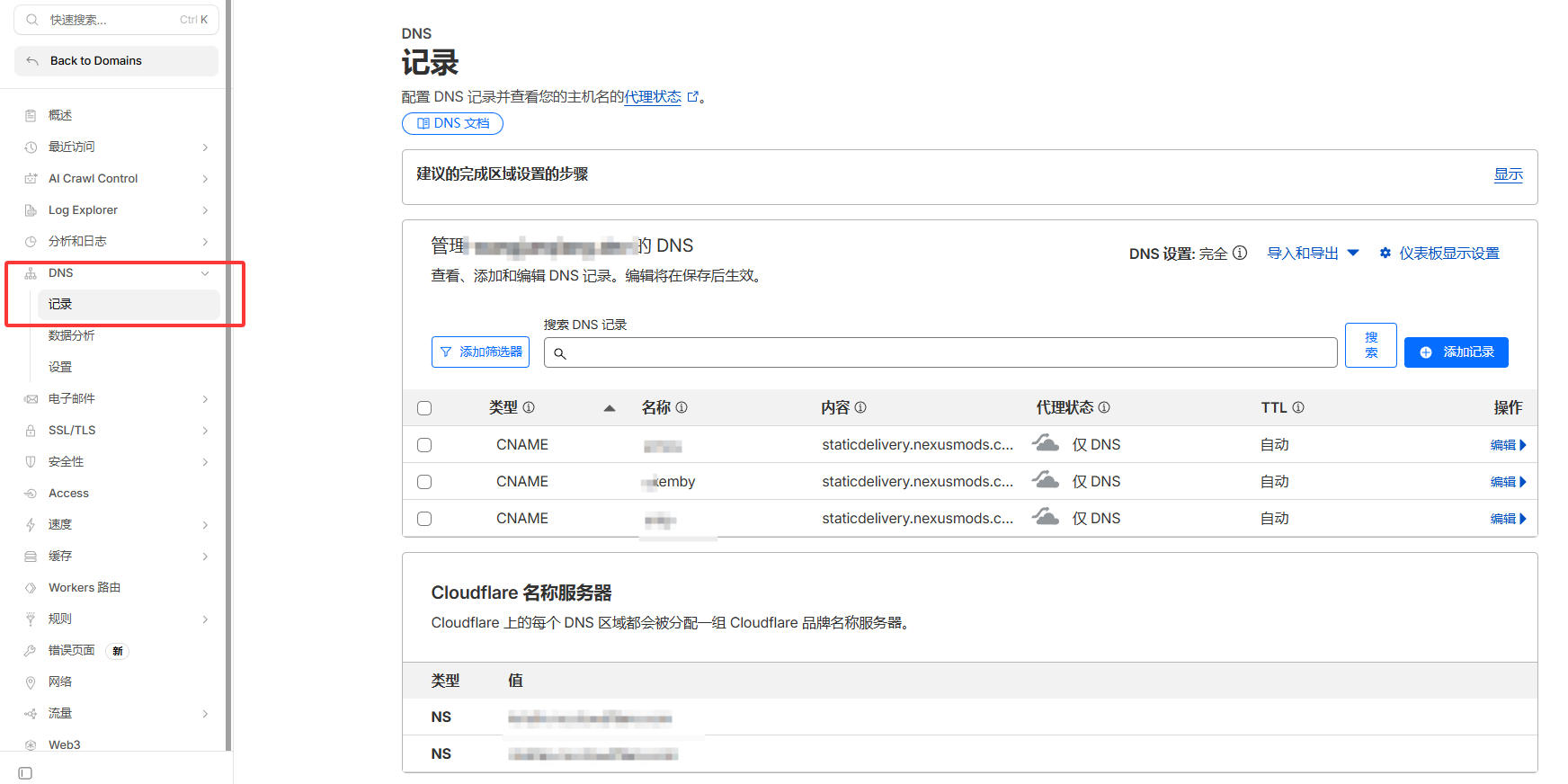
- 登录cloudflare 账户,进入您的域名管理页面,找到 DNS 设置。
- 添加一个 CNAME 记录,将您的子域名指向 Cloudflare 提供的优选域名。例如,如果您选择的优选域名是
staticdelivery.nexusmods.com,并且您的子域名是emby.yourdomain.com,则添加一条 CNAME 记录,将emby.yourdomain.com指向staticdelivery.nexusmods.com。
配置 Cloudflare Workers 路由
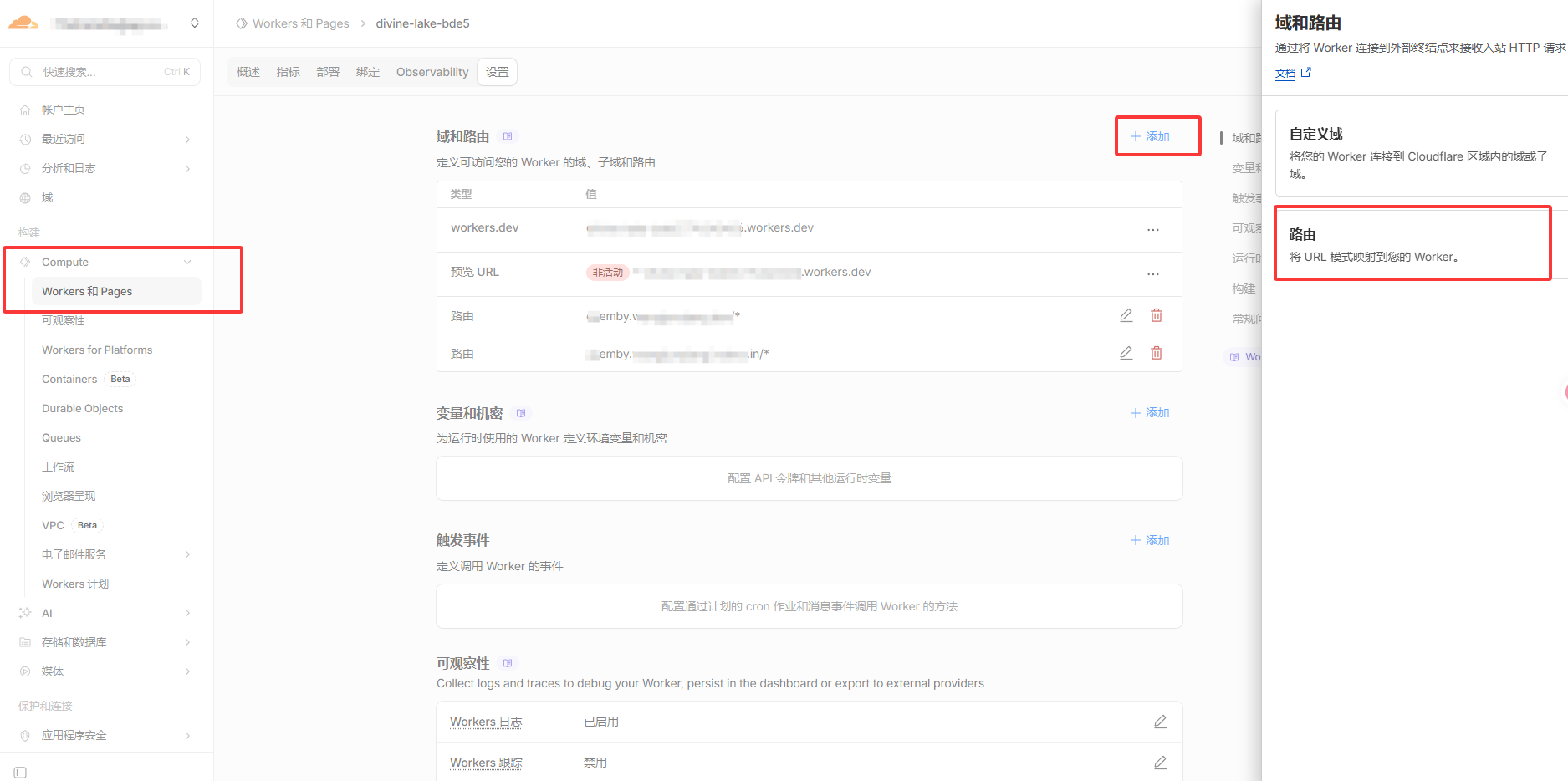
- 回到 Cloudflare Workers 页面,选择您的 Worker,点击设置。
- 添加一个新的路由,输入您刚才配置的子域名(例如
emby.yourdomain.com/*),并将其指向您的 Worker。
测试访问
- 等待 DNS 记录生效后,您可以通过访问您配置的子域名来测试您的 Worker 是否正常工作。例如,访问
https://emby.yourdomain.com看页面是否正常,然后在yamby等客户端中使用https://emby.yourdomain.com作为服务器地址测试是否能够正常连接和访问 emby 服务。 通过以上步骤,您就可以成功使用 Cloudflare Workers 实现 emby 的反向代理功能,并通过优选域名获得更好的访问性能。如果您在配置过程中遇到任何问题,可以参考 Cloudflare 的官方文档或社区论坛获取更多帮助。